AI Platform - v1 Implementation
Collection: AI Platform
This is the second entry in a collection about building a custom AI harness and orchestration layer for autonomous project work.
Introduction
Design Principles, the first post in this collection, maps my journey and presents 5 design principles that anchor all feature decisions in my platform.
Here’s a quick recap (with links back):
- Principle 1 - Work Is Driven From Tasks, Not Chat
- Principle 2 - Separation of Platform and Project
- Principle 3 - Isolation Is Non-Negotiable
- Principle 4 - Observe EVERYTHING That Happens
- Principle 5 - Give Lead Agents Budget & Mandate Delegation
I highly encourage you to read Design Principles first. Otherwise, waste no time, let’s dive in!
Platform Implementation
Tools are choices not requirements
This notebook entry mentions specific tools that I’ve implemented in my own personal AI platform.
Content is organized by the five principles I mentioned in Design Principles
Don’t read too much into any specific tool choice or its grouping.
Focus on what is being managed, prevented or achieved.
Again, tools are choices, not requirements. [foreshadow] Tools will evolve.
Principle 1 - Work Is Driven From Tasks, Not Chat
If we are going to work from tasks, I was going to need a place to put them! I also wanted a consistent place to manage project-level content like vision, design rules, etc.
A quick sidebar on markdown
I love markdown. Agents love markdown.
Pros:
From an LLM’s perspective, Markdown is the go-to format for just about everything.
Maintaining project content here would be easy. From a task/todo perspective, this would mean: checklists.
It’s free, just text files, quick and dirty, it works .
Cons:
I noticed that agents often forgot to check things off when complete.
Even with A LOT of prompting it wasn’t a guarantee.
There’s also zero visibility to a task list without opening each document.
Let alone, no aggregated view.
Because of these requirements, markdown was out.
I started thinking about other platforms: Google Sheets, ClickUp, Airtable, etc. Most of these are natively light-weight, but layer in look-ups and filters…I didn’t want to maintain a system; I needed a product that already worked.
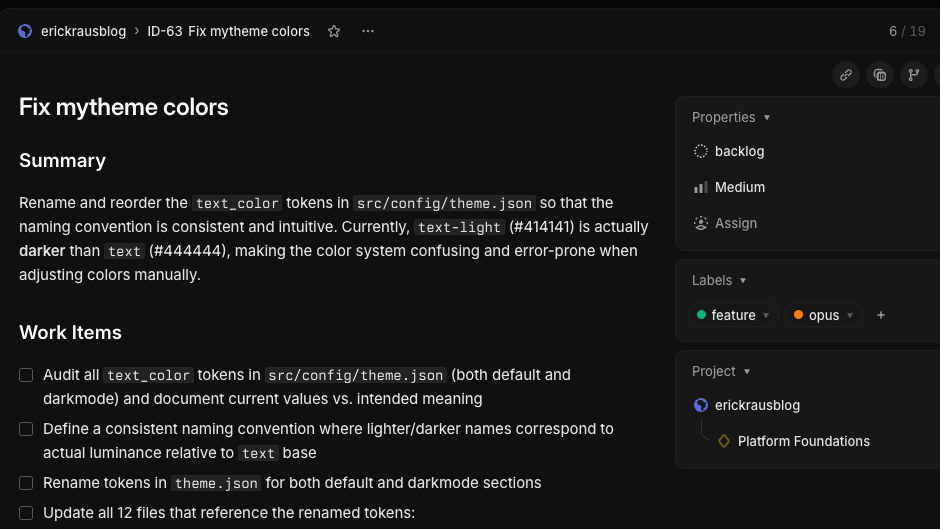
I was happy to have discovered Linear. Linear offered a great fit.
- super easy to use/intuitive
- markdown documents at the project level
- superb issue tracking with metadata
- MCP integration
- mobile app
Linear manages project/task content separately so project working folders stay clean with just the content, not strategy documents and stale checklists.
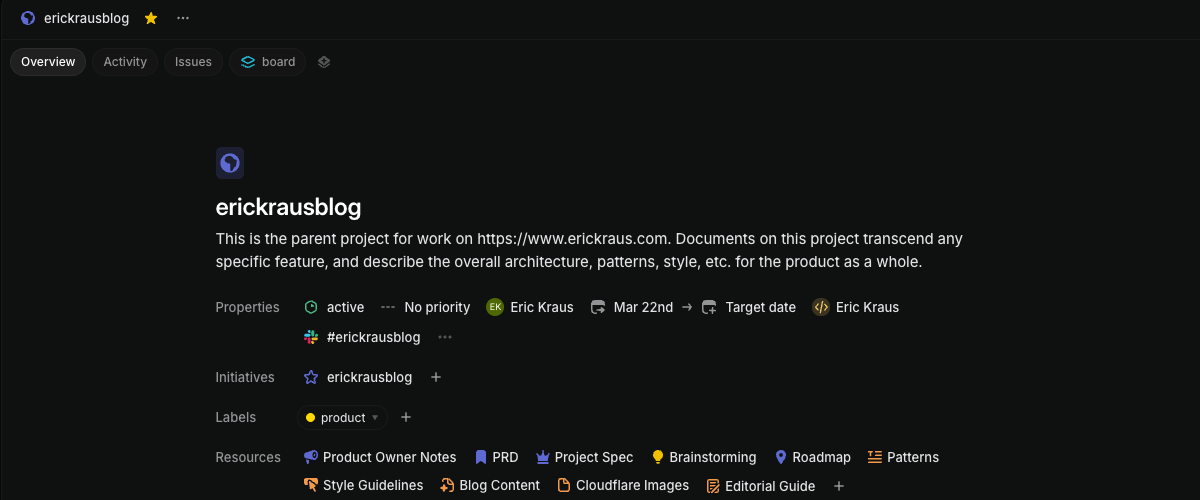
Initiatives: associated to projects, give agents a place to write updates about project work.
Labels: add metadata on projects/tasks - which I use to dynamically assign model, agent persona, permissions, tools, etc.
Principle 2 - Separation of Platform and Project
Separation of duties enables control and consistent operations.
Platform (i.e. Orchestration) Layer handles:
- Scheduler, configurable by project type
- Querying for issues and invoking agents
- Agent monitoring, granting tools & permissions, assigning rules
- Organization and fabrication of shared prompts
- Creating isolated working directories
Project (i.e Agent Invocation) Layer handles:
- Defines project documents, roadmap, issues and captures status updates
- Agent personas, models, tools - driven by labels on project/issue
- Subagent invocation by lead agents
- Session end summary
Platform
Kestra - handles scheduling (cron, by project) and calling scripts:
- issue_manager.py - called by Kestra to get next open task (Linear Issue)
- agent_manager.py - accepts project_name and issue_id parameters from Kestra
Kestra script to invoke agents…one script for all projects:
- id: invoke_agent
type: io.kestra.plugin.scripts.shell.Commands
commands:
- |
cd /Users/agent/ai && \
uv run python3 scripts/agent/agent_manager.py \
"{{ inputs.project }}" \
"{{ inputs.issue }}" \
--agent-type "{{ inputs.agent_type }}" \
--model "{{ json(taskrun.value).model }}" \
--plugins "{{ outputs.query_config.vars.plugins }}" \
--append-system-prompt "
CRITICAL: You must successfully read
your Linear issue before doing any work.
If the issue cannot be read, stop and return an Error" \
timeout: 35min # hard limitagent_manager - handles logic which ties all of the ‘pieces’ together for an agent call:
- dedicated working directory is created
- tools, MCP, permissions, etc.
- persona/shared prompts are merged with task-specific prompts
- all of the above are dynamically injected when the agent is called (important)
This may seem complex, but it’s not and brings HUGE benefits.
tldr
Think of agent_manager like a personal stylist:
selecting the right items from the rack to fit the specific person + occasion.
The Rack (personas, settings, tools):
- stored centrally in respective directories and can be used a la carte
- provides flexibility AND consistency across projects
- keeps project directories ‘clean’
- versioned separately - updating a prompt/perm doesn’t muddy project git history
- can handle nuanced situations programmatically
Project
Linear - everything an agent needs to know about a project is here
- project documents: vision, product requirements, tech stack
- tasks (issues): define work - scoped to be completed in a single agent session
- initiatives: tie one or more projects together, agents write session updates here
- “project” or “task” can be anything (not just ‘coding’)
The scripts, like agent manager, _only need updating if a new parameter type created. New “values” flow through dynamically. e.g. if I want to switch a different model or tool on a particular issue, it’s just a label on the Linear issue.
Adding a New Project
In the past, it would have meant duplicating/wiring up all of these things manually EACH time!
Now, the process is dead simple:
- create a project folder with 1-2 documents (vision or PRD)
- start creating tasks (issues) with existing labels
- No rewriting orchestration logic or prompts
- No digging/copying skills or prompts that are embedded in a project
- Context Flows from Three Layers
- Source
flowchart TB
  classDef platform fill:#365874,stroke:#6598A7,color:#E9EAEB
  classDef agent fill:#F0997B,stroke:#993C1D,color:#4A1B0C
  classDef contx fill:#98BFA6,stroke:#57817F,color:#454545
  classDef wrk fill:#665687,stroke:#a7a1cc,color:#E9EAEB
  P[Platform Layer:<br/>Scheduling, agent persona, tools, permissions]:::platform --> I[Agent Invocation]:::agent
  R[Project Layer:<br/>Code, build commands, project docs]:::platform --> I
  E[Dedicated 'isolated' workspace created]:::wrk --> I
  I --> W[Agent starts working with full context]:::contx
Principle 3 - Isolation is Non-Negotiable
There are two risk categories I am solving here, which are the responses to my experience running many agent requests:
- Agents make mistakes (or sometimes your plans change)
- Agents shouldn’t be able to see files outside of their workspace
Easy To Throw Away
This one is intuitive and arguably already considered a ‘best practice’ since humans ( should ) work this way too.
When things don’t go as planned, you need an emergency chute. If an agent, or you, spend a considerable amount of time hacking up files and you suddenly have a need to undo the work, it can be painful trying to undo things.
With a separate copy of the files, this makes it crystal clear what was changed by the agent. It also makes it easy to clean up / throw away.
Agents Can Stay Focused
This may seem less intuitive at first, but without this, agents can think they are being helpful by ‘working ahead’ or ‘anticipating’ what you need.
Sometimes, they waste too much time upfront exploring, even with all the necessary context.
With a separate copy of the files, and security constraints to just those files, it’s much cleaner to tell an agent:
“You have access to the full application.
Everything you need is in your directory”.
agent_manager
The heavy lift here comes from agent_manager:
- Creating a clone/worktree directory BEFORE the agent is called
- Agent doesn’t have to think/worry about it
- The agent gets invoked inside the directory - and, it can’t leave
# Check if branch already exists
branch_exists = run_git(["branch", "--list", branch])

# Build the git command, create branch if doesn't exist
if branch_exists:
  result = run_git(["worktree", "add", str(path), branch])
else:
  result = run_git( ["worktree", "add", "-b", branch, str(path), base])
info
A dedicated working directory + a properly designed feature/request means…
an agent that can get right to work!
The isolation is no inconvenience to the agent, but worth gold to me.
With these walls in place, I can relax some permissions and let agents have near-full access to do whatever (IN that directory).
Principle 4 - Observe EVERYTHING That Happens
The importance of this topic increases the more automation enters your system.
tldr
When chatting with agents, you will naturally have better visibility to what is happening.
However, when you wake up in the morning, and see hours of work that has been done, figuring out what happened, that’s a different ball game.
I tackle this through three layers of monitoring.
Platform/Orchestrator Steps
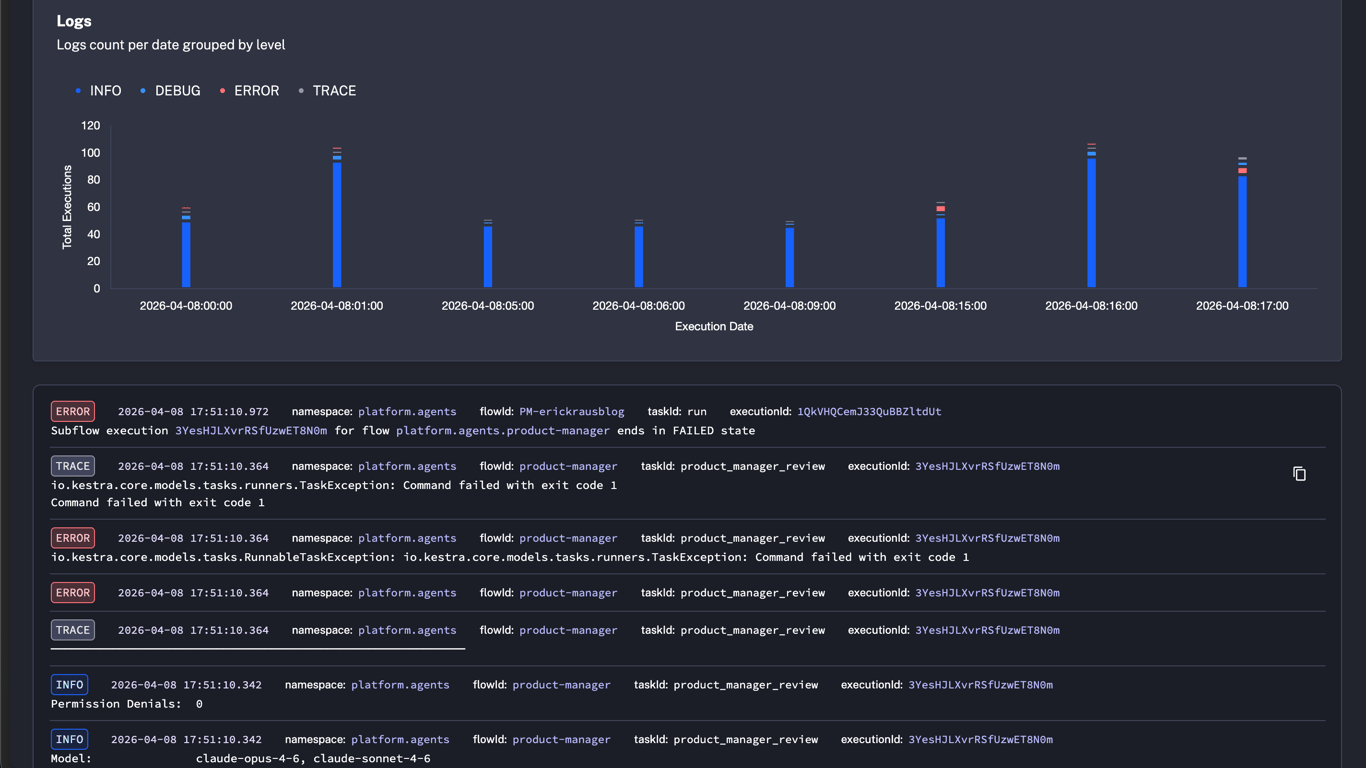
The orchestration (Kestra) script I showed above is deterministic:
it behaves the same way every single time.
tldr
Since orchestration is deterministic, problems are always environmental (never agent-related).
The final message from the agent, or more alarming: NO message, is also logged here.
Kestra dashboard offers quick scan of operations
Lead Agent Summaries
At every session end, the lead agent is requested to write a summary of what the team did.
This is for convenience, not audit, but it can surface concerns about the state of work.
Summaries are written to Linear (Initiatives). This then also doubles as my engagement interface with the team (agent) lead:
- I get @mentioned (notification) if there are outstanding questions
- I can comment back, request changes, or merge work back main project with a few clicks
-
I am the only person that can approve changes
back to production code
Here, the product-manager posted an update. The team is ready to work, but stuck with no issues to work on. (my fault!)
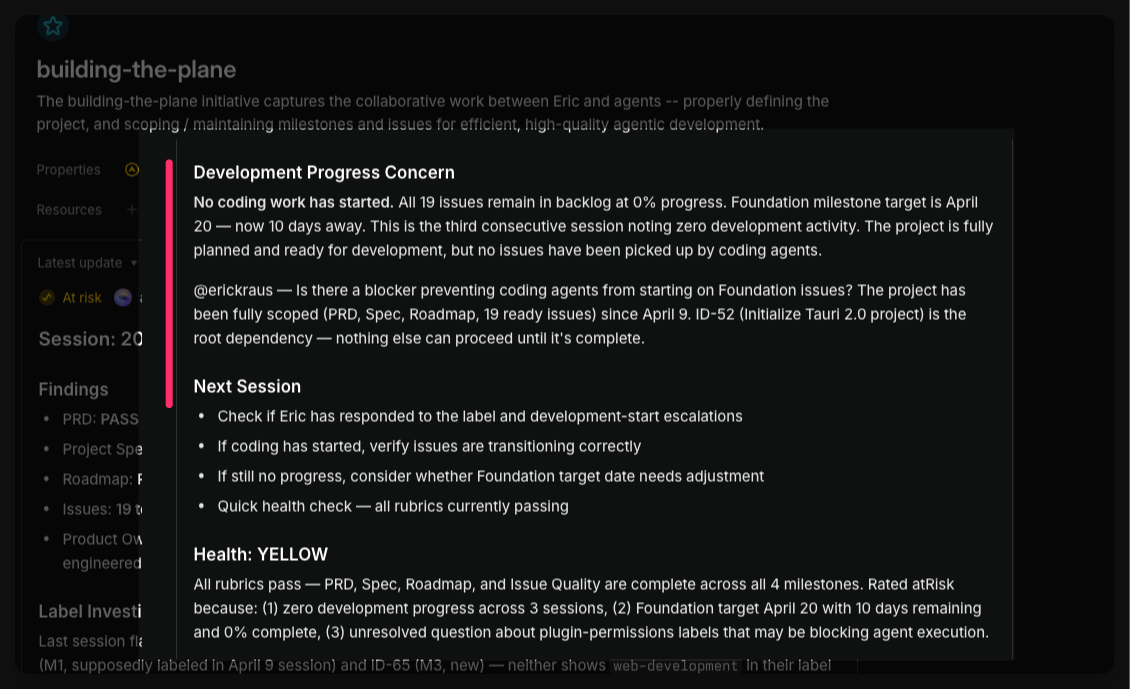
I can even cross reference with the orchestration’s log too, to see how the session ended.
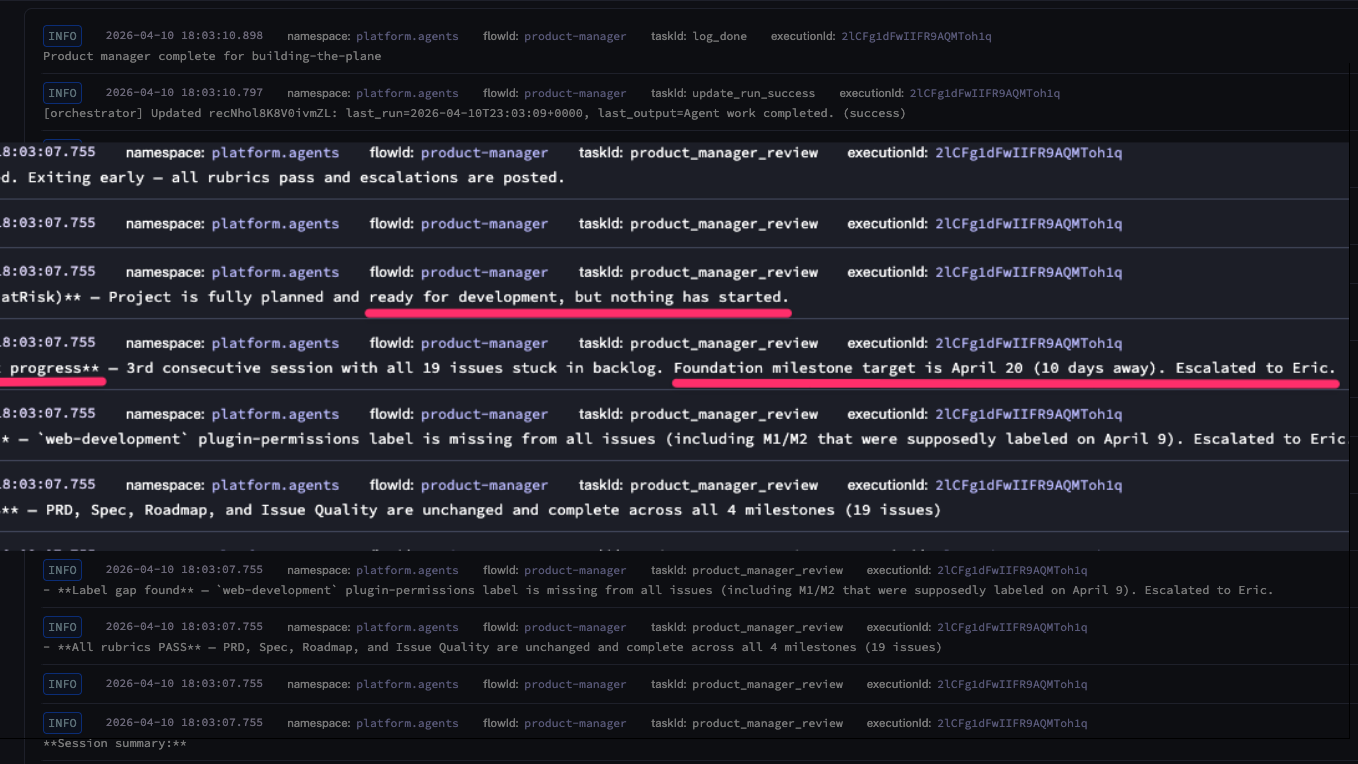
These two logging mechanisms alone are big gains, but:
- Lack the details of what actually happened during the session
- Agents are eager to please. I can’t trust challenges will make it in a session debrief
This is where the 3rd layer comes in.
Platform Watches Agents
The platform watches agents. Agents just work.
How it’s Setup:
- Hooks are part of the harness, under the execution layer
- Every tool call, every permission denial, every session event gets captured automatically
- Written “behind the scenes”** to a directory agents don’t have access to
- Logs are organized by project/date/session/etc for easy navigation
- Notifications can be sent (Slack, etc) when something happens e.g. permission is denied.
tldr
Agents are good at overcoming roadblocks…
but I still want to know what happened!
This is why this layer is so important: a verbose log and human readable transcript show me every action that was taken.
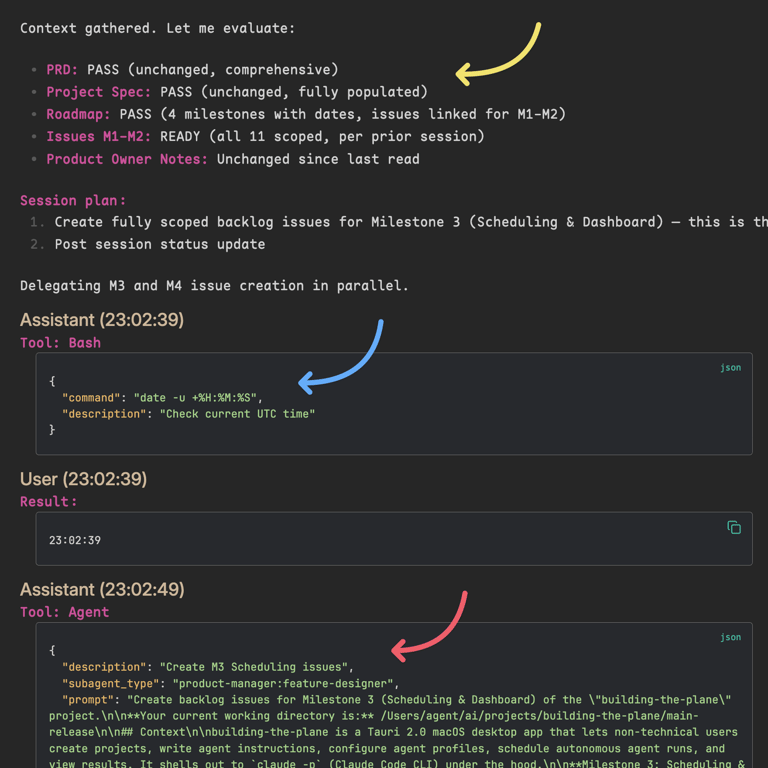
In the image below, a log for a product-manager review session is open in Obsidian:
- Yellow: Pre-flight rubrics PM is responsible for
- Session Plan
- Blue: PM checking the time
- Red: PM (lead) delegating to Feature Designer
Here I can see the product-manager did a thorough job validating the state.
Big Picture
Hiccups (or just validation) can now be diagnosed easily. It can surface “optimization enhancements” - where settings can be tuned or process / instructions weren’t clear enough.
Everything works together to paint a consistent (or differing) picture against what the agents said happened.
Critical: Agents never touch or write these logs
THIS
is the level of visibility that helps you build hands-off trust!
Principle 5 - Agent Budgets & Delegation Mandate
Agent Budgets
In my system, an agent gets two deadlines (budget):
- a soft limit injected into its instructions:
“You have until 9:30 UTC. Save work, write a summary of work on the Linear Issue”
- a hard limit at the process level that kills the session if it runs long
Agents frequently check time. You can see this in the image above. It works surprisingly well.
Delegation
Multi-agent teams are not only more effective, they are safer.
I’m in the process of moving most of my “do-er” agents to subagents under a lead agent.
tldr
I am almost certain this will become an industry best practice
Model Improvements Over Time
You might think more capable agents will do just fine on their own. You’d be right!
…and then, sometimes really wrong!
tldr
A multi-PhD researcher isn’t hired, paid top $$$, and left alone with no accountabilities.
Highly capable LLMs shouldn’t be treated any differently
Same image as above… You can see the produce-manager delegating feature-design work to a specialized agent…
Agents with different personas behave differently
→ A pragmatic product-manager and a driven developer agent make a great team.
→ An unsupervised developer agent with carte blanche directive is driven… dangerous.
More control the better models become
I think this control/management principle will become increasingly important as we see more capable models hit the market.
Tooling and instrumentation will continue as well providing more visibility, situational management, etc.
Wrap Up
But, Eric... why?
Why build all this when products already exist? A few thoughts…
To really appreciate how something works…
you have to take it apart and put it back together again.
Control
-
Many of my projects have nuances that were difficult to get right.
-
I was regularly battling: what I wanted to do vs. what the platform made me do
-
Flexibility and portability: I want to leverage the best parts of products, without being fully locked in - or to hedge against roadmap changes. [foreshadow]
This platform has finally turned AI from a chat assistant into a productivity partner.
It’s the culmination of countless hours brainstorming, incorporating patterns that I’ve seen fail with clients, had fail myself, and experiments I’ve tried and pressure-tested.
It’s not perfect. But, it works amazingly well today. And it’s mine.
[End]info
This concludes the main content of this entry.
Next Up: I had planned a quick follow up to go deeper into some examples of the specific components/tools of the platform.
However, as I’ve not-so-subtly alluded with [foreshadowing], I need to make some changes to the platform to maintain support with recent changes on Claude Code’s roadmap.
These changes need to happen first.
If you’re curious about those changes (and why)…more detail can be found in an Epilogue
Prefer content in your inbox?
I occasionally send out an email with site updates and other tech stuff. Zero Spam.
You'll get two emails initially: a confirmation link to verify, and a welcome message.
This site is protected by reCAPTCHA and the Google Privacy Policy and Terms of Service apply.