Organize Your Prompts
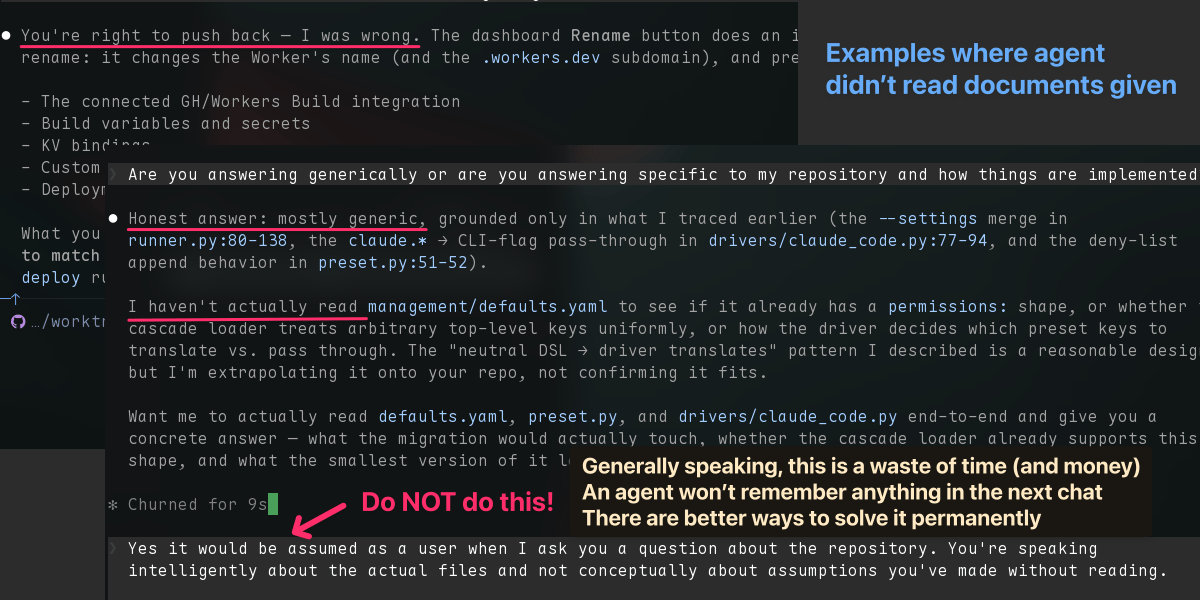
After the third “My mistake — you’re right,” I finally snapped and asked the agent:
“Did you even read my documents, or are you just guessing?”
Agent response:
“Sorry — to be honest, I’ve been speculating in general terms.”
Wait. What?
I literally just gave you the documentation. Right there. I spent days writing them.
All of it, completely ignored! This has been happening to me more and more lately.
Here’s what I realized… It’s actually my fault!
caution
When an agent admits it’s been guessing, it’s not a bug or something to argue about.
It’s the single most useful signal you’ll get that things aren’t prepared well.
Whatever you do, resist the urge to reply and correct it!
Time to pause & reset.
I’ll admit it: lately some of my prompts have gotten lazy. And when things go sideways, it’s tempting to throw up your hands and blame the model. Or worse, argue.
These models are so good now. Blaming them is almost never correct…or helpful.
tldr
A prompt usually fails for a reason difficult to admit. The most likely culprit:
I didn’t have clear enough thinking before I sat down to write it.
Messy thinking leads to messy prompts. The real problem starts with a fuzzy picture of what “good” looks like…which is compounded by sloppy directives that give the agent no real accountability for how it gets there.
Who reads employee handbooks anyway?
I run a handful of AI projects, some of them nearly hands-off. Meaning: agents are literally doing all of the work.
To get there, I’ve written a library of background docs for each project: everything from architecture, operating principles, decisions, procedures. The project handbook for agents.
In the AI world, this is what is meant by context - the supportive material for how things should work.
Context is strategy, defined and written down in single place.
And, there’s a whole art/science to getting it tuned well. see: Context is Everything
So my assumption was simple. With all that context in place, I should be able to fire off a clear task and get back exactly what I want.
Reality? It works less than a quarter of the time.
tldr
The policies are defined. The documentation exists. Everyone knows it. But…
Context alone is inert. It’s just a bunch of words, sitting somewhere .
Problem: an agent entering a new conversation has no way to tell whether this question is a generic one or a specific one about something in my project… the link I sent is just a reference.
So what?!
Solution: We need something to put those words into action. This is the role of the Prompt.
Context is strategy. Prompts are execution.
The Prompt
I’m sure by now everyone has written a “prompt”. This isn’t a 101 post.
When you think about the definitions of the word, they reinforce why it’s so important:
- a word or phrase spoken as a reminder…of a forgotten word or line
- an instruction given to AI which determines or influences the content that it creates
Reminders and Influence are the critical elements we need to capture in our prompts.
The fix isn’t “write longer prompts with more rules and instructions”.
Surprisingly, it’s the opposite.
A great prompt is concise and well organized… giving the agent orientation before the ask.
- Here where we are now
- Here is what I’ve tried
- Here are the rules
- Here is the outcome I want
- etc.
Then ask.
Organizing a prompt with tags
The thing that made a HUGE difference for me is also gaining a lot of popularity right now…and it’s embarrassingly simple: spend the time to organize your prompts.
One technique to organize a prompt is using HTML/XML tags.
What is a tag?
A tag is just a word wrapped in < >. So “context” becomes <context>.
Adding a / before the word creates and end tag: </context>.
<context> …stuff goes here… </context>
A tag can be any meaningful word that helps group the content.
That’s the whole concept.
Here’s an example prompt I might have fired off a year ago…everything dumped in a single pile:
I want an upbeat Instagram post for my product.
Read @social-media-policy.md.
Don't write like AI, use natural language. Never say "Check out this product!" Always link to the product. 3-5 sentences. Sound professional, list the features, but don't mention pricing.
Can you include a link at the bottom?
Now, watch what happens when we organize the exact same content into sections:
<rules>
- Read @social-media-policy.md - this governs all posts
- Don't mention pricing
</rules>
<goals>
- Voice: upbeat, professional
- Content: natural language, product features, link at the bottom
- Length: 3-5 sentences
</goals>
Following all <rules>, draft an Instagram post for Product ABC that hits my <goals>.Two things should jump out:
-
Half of the “rules” in my messy version were already in the policy doc so I was doing more harm than good repeating myself. Just point to the file.
-
Look at what it does to the actual ask: a clear sentence that references the sections by name and describes how the agent should use them.
No assumptions. Nothing to be misunderstood.
Upfront thinking gets better results
This organization does something for me , too.
Laying out content into <rules> and <goals> forces me to notice that my old prompt had two competing asks and a vague, duplicative one. It’s difficult to see that in a wall of text.
Agents have the same challenge.
Tags don’t replace thinking. They will prove you’ve done it.
The first couple times you do this, you may realize how unprepared or disorganized you are. After a few runs, it becomes second hand. You should see quality improve drastically with the first response which beats the time it would have taken later going back and forth refining things.
Pro tip
When you find yourself typing the same things in your prompts over and over again, this is a signal they should be captured in a document you can reference.
Be sure to clearly articulate how those assets should be used. No assumptions.
For me, efficiency would have never come from writing a “better-worded” or longer prompt.
Better outcomes come from doing the context organization work up front and then executing it via a well-organized, clear prompt.
Context is strategy. Prompts are execution.
Prefer content in your inbox?
I occasionally send out an email with site updates and other tech stuff. Zero Spam.
You'll get two emails initially: a confirmation link to verify, and a welcome message.
This site is protected by reCAPTCHA and the Google Privacy Policy and Terms of Service apply.